
MultiCharts vs Optuma: Comparing Backtesting Software for Systematic Trading
If you’re choosing between MultiCharts and Optuma for backtesting and developing your trading systems, the best choice depends on your priorities.
MultiCharts is stronger for serious quantitative traders who need flexible scripting, multi-broker integration, and powerful backtesting. Optuma shines for institutional-grade visualization, custom indicators, and market breadth analysis but is weaker in system development realism.
For most systematic traders focused on consistent execution, MultiCharts offers more versatility and better long-term value. But there’s nuance – so let’s break it down.
MultiCharts vs Optuma at a Glance:
Short on time? Here’s how MultiCharts vs Optuma compare side by side.
|
Feature |
MultiCharts |
Optuma |
|
Operating System |
Windows only |
Windows; Cloud version (Enterprise only) |
|
Scripting Language |
PowerLanguage (EasyLanguage compatible) |
OSL (proprietary) |
|
Strategy Backtesting |
Portfolio-level backtesting & walk-forward |
Basic testing; portfolio-level in Enterprise |
|
Optimization |
Genetic, exhaustive, walk-forward |
Brute force, no walk-forward (unless Enterprise) |
|
Charting |
Advanced multi-timeframe |
Highly customizable & institutional-grade |
|
Automation |
With brokers (IB, CQG, TradeStation, etc.) |
Limited execution (IB only) |
|
Learning Curve |
Moderate (especially if familiar with EasyLanguage) |
Steep for scripting; GUI easier |
|
Cost |
Lifetime or subscription |
Subscription only (from ~$810/year) |
|
Documentation & Support |
Solid knowledge base & forum |
Steep learning curve; documentation mixed |
Platform Overview, Cost & Compatibility
MultiCharts is a Windows-only platform designed for traders needing high-performance backtesting, charting, and execution. It supports multiple brokers and uses PowerLanguage, which is very similar to EasyLanguage. You can choose between a lifetime license or a subscription.
Optuma, by contrast, is positioned more toward institutional analysts and technical researchers. It’s also Windows-based but offers a cloud version for enterprise users. The subscription model ranges from ~$810/year (Trader edition) to over $3,000/year for full features.
If you’re trading systematically with your own capital, MultiCharts gives better flexibility and a more scalable cost structure.
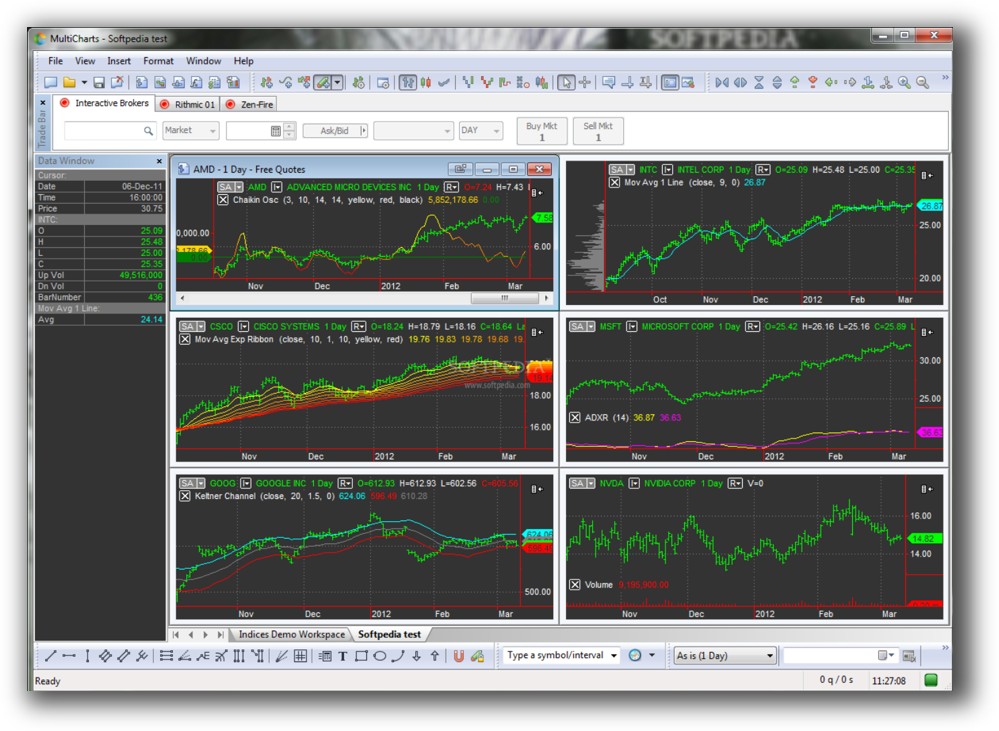
MultiCharts Main View:
Optuma Main View:

Market Access & Data Support in MultiCharts vs Optuma
MultiCharts integrates directly with a wide range of brokers and data providers – Interactive Brokers, CQG, Rithmic, and more. This means you can backtest and trade live from one platform without switching tools.
Optuma also supports Interactive Brokers but is less versatile for automated live trading. Its data integration is excellent for institutional feeds (Bloomberg, Reuters), but overkill for the average independent trader.
Verdict: MultiCharts wins on integration and practical connectivity for retail traders.
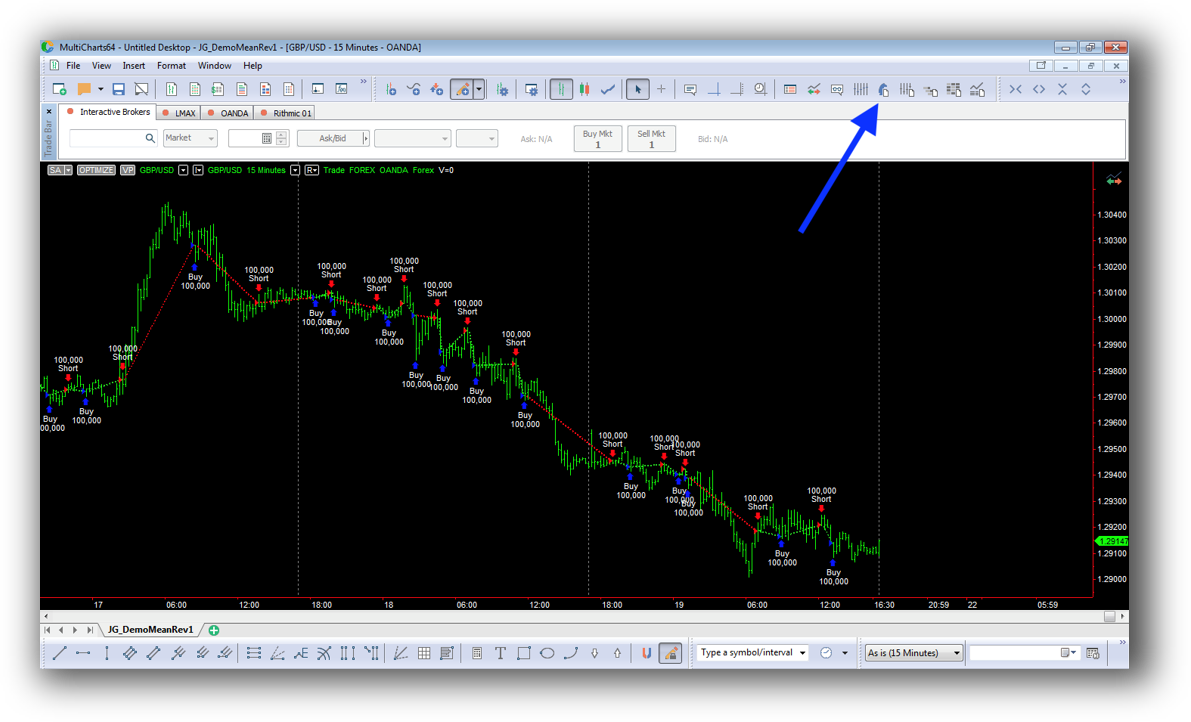
MultiCharts Backtesting Interface:
Optuma Backtesting Interface:

Building & Customizing Trading Strategies
MultiCharts uses PowerLanguage, which is similar to EasyLanguage, making it relatively easy to get started if you’ve used platforms like TradeStation or AmiBroker.
Optuma has a proprietary scripting language (OSL), which is more complex and less widely adopted. While its GUI builder is useful, system developers will find the scripting less intuitive than MultiCharts.
MultiCharts supports modular strategy development, multiple timeframes, and portfolio-level simulations, making it a more robust option for serious trading system development.
Check Out: Trading System Development
MultiCharts Code Editor (PowerLanguage):

Optuma Code Editor (Script Manager):

Backtesting Performance, Speed & Realism
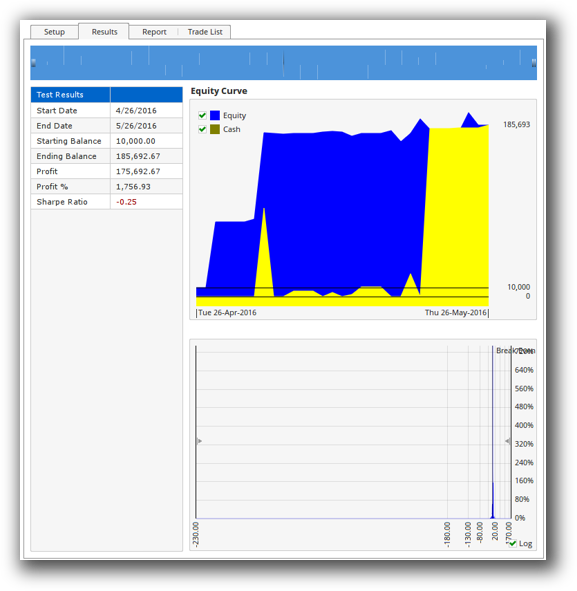
MultiCharts provides fast, event-driven backtesting, including portfolio-level simulation and walk-forward testing out of the box.
Optuma’s backtesting is more focused on single-symbol testing and requires the Enterprise version for true portfolio-level testing and walk-forward analysis. There’s also less transparency on slippage modeling, position sizing, and execution constraints.
If you’re building strategies that require realism – including drawdown control, slippage, or dynamic position sizing – MultiCharts is clearly superior.
Check out: Backtesting | Drawdown
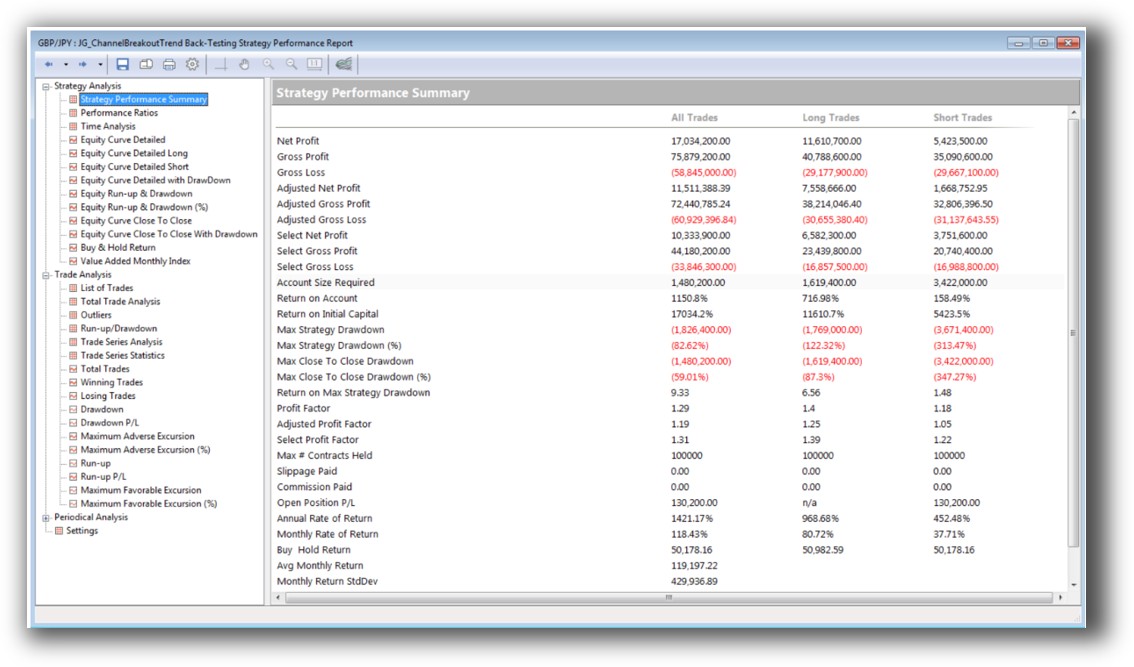
MultiCharts Backtest Report:
Optuma Backtest Report:
Strategy Optimization & Stress Testing Tools
MultiCharts includes genetic and exhaustive optimizers, as well as walk-forward analysis and custom fitness functions. You can simulate real-world variability in inputs to test robustness against curve fitting.
Optuma does support parameter optimization, but walk-forward testing and Monte Carlo are only available in higher Enterprise tiers, making it less accessible for independent traders.
Robustness testing is critical to avoid curve fitting. With MultiCharts, you get more transparency and more tools without needing institutional licenses.
Check Out: Trading System Optimization
MultiCharts Walk-Forward Parameters:

Charting Features, Signal Exploration & Live Execution
Optuma’s strength lies in its highly customizable charts, breadth indicators, and institutional-grade scanning tools. If your work leans heavily on technical analysis or market breadth studies, Optuma offers unique capabilities.
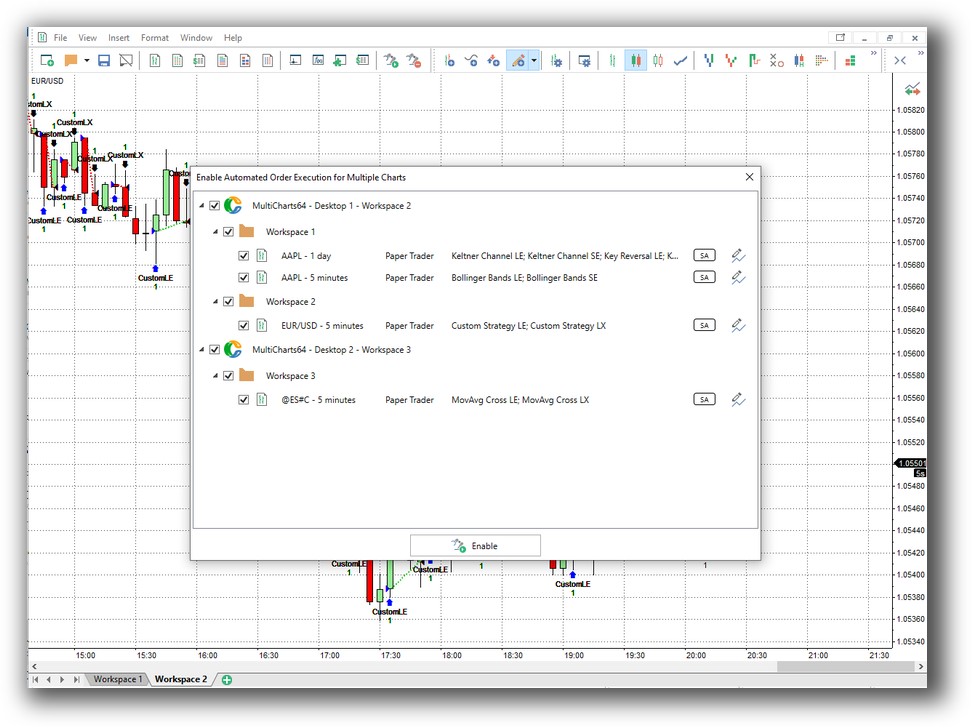
MultiCharts offers advanced multi-timeframe charting, indicator overlays, and scanning, though not as visually polished as Optuma. However, it integrates directly with brokers for automated execution, which Optuma does not (except via limited IB support).
If your workflow depends on execution automation, MultiCharts is the better choice.
Check Out Order Types | Automated Trading Systems
MultiCharts Automation Set Up:
Optuma Automation Set Up:

Support, Documentation & Learning Resources
MultiCharts has a comprehensive online knowledge base, a responsive forum, and plenty of third-party resources due to its EasyLanguage compatibility.
Optuma’s documentation is more fragmented, and its proprietary scripting language adds to the learning curve. GUI workflows are easier, but complex system development requires more effort.
For traders who value time efficiency, MultiCharts wins again.
MultiCharts Forum Front Page is illustrated down below:

Optuma Forum Front Page is illustrated down below:

MultiCharts vs Optuma: Which One Should You Use?
For systematic traders who want to develop, test, and automate trading systems quickly and realistically, MultiCharts offers more power, realism, and flexibility.
Optuma is best suited for advanced discretionary traders, researchers, or institutions doing technical market analysis, but it lacks the robustness tools and automation retail system traders need.
Our Recommendation
If you’re serious about systematic trading, building your edge, and saving years of trial-and-error, choose MultiCharts. It gives you the tools to build, backtest, optimize, and even automate your trades with more realism and control.
That said, if charting, visualization, and research are your priority, and you’re not concerned with automation or portfolio-level backtests, Optuma may serve your needs.
But for most traders who want consistency, automation, and confidence in their trading rules – MultiCharts is the better backtesting software.
Want The Rest of the Puzzle?
Backtesting software is just one piece. The real transformation happens when you align your tools, your systems, and your psychology with your goals.
If you’re tired of chasing tips and want to build wealth systematically, the next step is clear: The Trader Success System.
Inside, you’ll discover:
- Proven trading systems
- A step-by-step backtesting framework
- Position sizing tools
- Automation strategies that let you trade in 30 minutes or less
Trading and Backtesting Software Review List
- RealTest vs Amibroker
- RealTest VS TradeStation
- RealTest VS NinjaTrader
- RealTest VS MultiCharts
- RealTest VS Wealth-Lab
- RealTest VS Beyond Charts
- RealTest VS Optuma
- RealTest VS TradingView
- RealTest VS MetaTrader 4 (MT4)
- RealTest VS MetaTrader 5 (MT5)
- AmiBroker VS TradeStation
- AmiBroker VS NinjaTrader
- AmiBroker VS MultiCharts
- AmiBroker VS Wealth-Lab
- AmiBroker VS Beyond Charts
- AmiBroker VS Optuma
- AmiBroker VS TradingView
- AmiBroker VS MetaTrader 4 (MT4)
- AmiBroker VS MetaTrader 5 (MT5)
- TradeStation VS NinjaTrader
- TradeStation VS MultiCharts
- TradeStation VS Wealth-Lab
- TradeStation VS Beyond Charts
- TradeStation VS Optuma
- TradeStation VS TradingView
- TradeStation VS MetaTrader 4 (MT4)
- TradeStation VS MetaTrader 5 (MT5)
- NinjaTrader VS MultiCharts
- NinjaTrader VS Wealth-Lab
- NinjaTrader VS Beyond Charts
- NinjaTrader VS Optuma
- NinjaTrader VS TradingView
- NinjaTrader VS MetaTrader 4 (MT4)
- NinjaTrader VS MetaTrader 5 (MT5)
- MultiCharts VS Wealth-Lab
- MultiCharts VS Beyond Charts
- MultiCharts VS Optuma
- MultiCharts VS TradingView
- MultiCharts VS MetaTrader 4 (MT4)
- MultiCharts VS MetaTrader 5 (MT5)
- Wealth-Lab VS Beyond Charts
- Wealth-Lab VS Optuma
- Wealth-Lab VS TradingView
- Wealth-Lab VS MetaTrader 4 (MT4)
- Wealth-Lab VS MetaTrader 5 (MT5)
- Beyond Charts VS Optuma
- Beyond Charts VS TradingView
- Beyond Charts VS MetaTrader 4 (MT4)
- Beyond Charts VS MetaTrader 5 (MT5)
- Optuma VS TradingView
- Optuma VS MetaTrader 4 (MT4)
- Optuma VS MetaTrader 5 (MT5)
- TradingView VS MetaTrader 4 (MT4)
- TradingView VS MetaTrader 5 (MT5)
- MetaTrader 4 (MT4) VS MetaTrader 5 (MT5)


