

Optuma VS MetaTrader 5: Comparing Backtesting Software for Systematic Trading
If you’re comparing backtesting software for systematic trading, Optuma and MetaTrader 5 (MT5) offer vastly different capabilities and user experiences.
In short: Optuma is better suited to traders who need advanced market analysis, custom scripting, and institutional-grade charting. MetaTrader 5 excels in automated execution and forex-centric strategy development but lacks depth for stock-based system traders.
Let’s break down where each trading software shines (and where it falls short) so you can decide which is right for your trading systems.
Optuma VS MetaTrader 5 at a Glance:
Short on time? Here’s how Optuma VS MetaTrader 5 compare side by side.
|
Feature |
Optuma |
MetaTrader 5 (MT5) |
|
Year Released |
1996 |
2010 |
|
Operating Systems |
Windows; Web via Remote Desktop |
Windows, Mac (via emulation), Web |
|
Cost |
Paid: $810–$2,300+/yr |
Free via brokers |
|
Backtesting Engine |
Basic testing; portfolio-level in Enterprise |
Strategy Tester (single symbol) |
|
Strategy Language |
OSL (proprietary scripting) |
MQL5 (C-style coding) |
|
Charting |
Institutional grade, flexible |
Basic to intermediate |
|
Broker Integration |
Interactive Brokers |
Wide broker integration |
|
Automation |
Limited (via broker plugin) |
Strong (via Expert Advisors) |
Platform Overview, Cost & Compatibility
Optuma is a paid, professional-grade desktop platform built primarily for technical analysis. It runs on Windows, and Mac users must use emulation (e.g. Parallels or Bootcamp). The pricing structure starts around USD $810 per year for retail traders, with higher tiers for professionals.
MetaTrader 5 (MT5), by contrast, is free to use when provided by a broker. It’s a staple in the forex and CFD trading world. It supports Windows natively, has a web version, and can run on macOS via virtualization.
If cost is your primary concern and you’re focused on forex or crypto, MT5 is appealing. But for stock market system traders, Optuma’s feature depth and flexibility justify the investment.
Optuma Main View:

MetaTrader 5 Main View:

Market Access & Data Support in Optuma VS MetaTrader 5
Optuma supports a wide range of asset classes: equities, ETFs, futures, forex, indices, and even cryptocurrencies via Norgate and other data vendors. It’s well-suited to global stock traders using EOD (end-of-day) data.
MT5 focuses primarily on forex and CFD instruments, with real-time data fed directly from your connected broker. While it technically supports stocks and futures, its depth in these areas is limited compared to purpose-built trading software.
Optuma Backtesting Interface:

MetaTrader 5 Backtesting Interface:

Building & Customizing Trading Strategies
Optuma uses its own scripting language (OSL) for building strategies and indicators. It’s designed for traders with an analytical mindset who want control without necessarily coding in a traditional language. However, it’s not intuitive for those without scripting experience, and there’s a learning curve.
MT5, on the other hand, uses MQL5, a C-style language ideal for developing Expert Advisors (EAs), custom indicators, and scripts. It’s powerful but requires programming knowledge. The built-in MetaEditor and strategy tester provide a smooth developer experience for those comfortable with code.
If your focus is rapid system prototyping without writing full C-style programs, Optuma offers more accessibility.
Check Out: Trading System Development
Optuma Code Editor:

MetaTrader 5 Code Editor:

Backtesting Performance, Speed & Realism
This is where the differences matter most for systematic traders.
Optuma’s backtesting is more focused on single-symbol testing and requires the Enterprise version for true portfolio-level testing and walk-forward analysis. There’s also less transparency on slippage modeling, position sizing, and execution constraints.
MT5 is fast but limited: It’s built primarily for single-symbol testing. You cannot simulate a true portfolio, and most tests assume perfect fills without accounting for capital allocation across strategies.
For realistic, system-based backtesting across multiple markets or systems, MT5 is inadequate. Optuma is better, though it still falls short of best-in-class tools like RealTest.
Check out: Backtesting | Drawdown
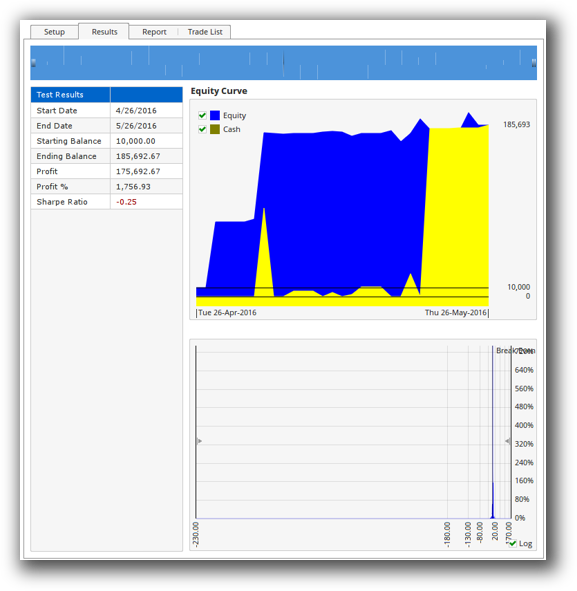
Optuma Backtest Report:
MetaTrader 5 Backtest Report:

Strategy Optimization & Stress Testing Tools
Optuma supports walk-forward testing, Monte Carlo analysis, and parameter scans. It’s suitable for exploring robustness across a wide range of inputs, though it can be computationally intensive.
MT5 provides brute-force and genetic optimizations within its Strategy Tester. It’s efficient and visually intuitive but mainly focused on parameter tweaking, not robustness validation. Monte Carlo testing is absent.
If you want to perform proper trading system optimization with robust statistical analysis, Optuma gives you more control and deeper insights.
MetaTrader 5 Genetic Optimization:

Charting Features, Signal Exploration & Live Execution
Optuma is a leader in institutional-grade charting. Its visual tools are highly configurable, with deep scanning and signal generation features. Traders can create complex custom indicators and visualizations across multiple timeframes.
However, Optuma’s execution capabilities are limited. While Interactive Brokers is integrated for order placement, automation is not core to the platform.
MT5 offers decent charting, but it’s more basic. Scanning features are rudimentary without additional plugins or manual coding. Where MT5 shines is in automation: You can fully automate trade execution with Expert Advisors across supported brokers.
In short:
- Use Optuma for market analysis and scanning.
- Use MT5 if you need low-latency automated execution (especially for forex).
Check Out Order Types | Automated Trading Systems
Optuma Automation Set Up:

MetaTrader 5 Automation Set Up:

Support, Documentation & Learning Resources
Optuma has a steep learning curve but offers a professional support system. The documentation is detailed, though not always beginner-friendly. Training materials are more geared toward institutional users.
MT5 benefits from a massive online community, with forums, tutorials, and thousands of third-party scripts. However, the official documentation is limited, and much of the community content is outdated or of low quality.
Compared to RealTest’s modern, concise docs, both platforms could improve. But MT5 is easier to find help for, especially for coding-related questions.
Optuma Forum Front Page is illustrated down below:

MetaTrader 5 Forum Front Page is illustrated down below:

Optuma VS MetaTrader 5: Which One Should You Use?
If your priority is realistic, rules-based portfolio backtesting and advanced market analysis, Optuma is the better choice. It supports EOD data, custom scripting, and multi-system testing – all key for a disciplined, systematic trader.
If you trade primarily forex or CFDs, want automated execution, and are comfortable with programming, MetaTrader 5 is hard to beat, especially at the price point (free).
But if you’re serious about becoming a consistent, confident trader, neither tool is the endgame.
Our Recommendation
Optuma is a strong backtesting platform for discretionary-to-systematic traders who want to visually scan, script, and test strategies across global stock markets.
MetaTrader 5 is best for automated forex trading with brokers that support it.
But for system traders focused on speed, realism, and portfolio-level backtesting, we recommend RealTest as the preferred backtesting software.
RealTest outperforms both Optuma and MT5 in:
- Realistic multi-system simulation
- Ease of use for non-coders
- Simplicity and clarity of strategy design
- Seamless integration with end-of-day workflow
Want The Rest of the Puzzle?
Backtesting software is just one piece. The real transformation happens when you align your tools, your systems, and your psychology with your goals.
If you’re tired of chasing tips and want to build wealth systematically, the next step is clear: The Trader Success System.
Inside, you’ll discover:
- Proven trading systems
- A step-by-step backtesting framework
- Position sizing tools
- Automation strategies that let you trade in 30 minutes or less
Trading and Backtesting Software Review List
- RealTest vs Amibroker
- RealTest VS TradeStation
- RealTest VS NinjaTrader
- RealTest VS MultiCharts
- RealTest VS Wealth-Lab
- RealTest VS Beyond Charts
- RealTest VS Optuma
- RealTest VS TradingView
- RealTest VS MetaTrader 4 (MT4)
- RealTest VS MetaTrader 5 (MT5)
- AmiBroker VS TradeStation
- AmiBroker VS NinjaTrader
- AmiBroker VS MultiCharts
- AmiBroker VS Wealth-Lab
- AmiBroker VS Beyond Charts
- AmiBroker VS Optuma
- AmiBroker VS TradingView
- AmiBroker VS MetaTrader 4 (MT4)
- AmiBroker VS MetaTrader 5 (MT5)
- TradeStation VS NinjaTrader
- TradeStation VS MultiCharts
- TradeStation VS Wealth-Lab
- TradeStation VS Beyond Charts
- TradeStation VS Optuma
- TradeStation VS TradingView
- TradeStation VS MetaTrader 4 (MT4)
- TradeStation VS MetaTrader 5 (MT5)
- NinjaTrader VS MultiCharts
- NinjaTrader VS Wealth-Lab
- NinjaTrader VS Beyond Charts
- NinjaTrader VS Optuma
- NinjaTrader VS TradingView
- NinjaTrader VS MetaTrader 4 (MT4)
- NinjaTrader VS MetaTrader 5 (MT5)
- MultiCharts VS Wealth-Lab
- MultiCharts VS Beyond Charts
- MultiCharts VS Optuma
- MultiCharts VS TradingView
- MultiCharts VS MetaTrader 4 (MT4)
- MultiCharts VS MetaTrader 5 (MT5)
- Wealth-Lab VS Beyond Charts
- Wealth-Lab VS Optuma
- Wealth-Lab VS TradingView
- Wealth-Lab VS MetaTrader 4 (MT4)
- Wealth-Lab VS MetaTrader 5 (MT5)
- Beyond Charts VS Optuma
- Beyond Charts VS TradingView
- Beyond Charts VS MetaTrader 4 (MT4)
- Beyond Charts VS MetaTrader 5 (MT5)
- Optuma VS TradingView
- Optuma VS MetaTrader 4 (MT4)
- Optuma VS MetaTrader 5 (MT5)
- TradingView VS MetaTrader 4 (MT4)
- TradingView VS MetaTrader 5 (MT5)
- MetaTrader 4 (MT4) VS MetaTrader 5 (MT5)


