

Optuma VS TradingView: Comparing Backtesting Software for Systematic Trading
If you’re a serious trader looking for the best backtesting software, choosing between Optuma and TradingView can feel like a maze. While both platforms offer strong visual tools and data access, only one is better suited to systematic traders who want to build rules-based strategies, simulate portfolios, and eliminate discretionary guesswork.
Optuma is more powerful for serious system traders needing advanced backtesting and professional market analysis tools. TradingView shines for ease of use, charting, and community-driven exploration but lacks portfolio-level testing.
Let’s break it down feature by feature.
Optuma VS TradingView at a Glance:
Short on time? Here’s how Optuma VS TradingView compare side by side.
|
Feature |
Optuma |
TradingView |
|
Platform Type |
Windows desktop + cloud (via Parallels) |
Web-based + desktop (Mac & PC) |
|
Year Established |
1996 |
2011 |
|
Cost |
From ~$810/year (Trader) |
Freemium; paid plans from ~$155/year |
|
Backtesting |
Multi-code, multi-symbol |
Single asset, no portfolio simulation |
|
Programming |
Optuma Scripting Language (OSL) |
Pine Script (v4/v5) |
|
Market Access |
ASX, US, TSX, FX, Futures, more |
Most global markets (delayed & real-time) |
|
Execution |
Supports Interactive Brokers |
Multiple broker integrations |
|
Strategy Optimization |
Monte Carlo, Walk Forward |
Basic parameter sweeps only |
|
Portfolio Simulation |
Advanced |
Not supported |
|
Support |
Phone, email, manuals, professional docs |
Chat, forums, large community |
Platform Overview, Cost & Compatibility
Optuma is a professional-grade platform originally built for institutional research desks. It’s Windows-based but can run on Mac using Parallels. It offers multiple pricing tiers based on your data and module needs. While the cost is higher, you’re paying for robust analytical depth.
TradingView is browser-based and user-friendly. It runs on any device and has free access to many features, with optional paid plans unlocking more indicators, chart layouts, and data speeds. It’s simple to use, which makes it appealing to casual traders – but limited for systematic development.
Verdict: If you’re focused on system design and portfolio-level testing, Optuma is worth the investment. TradingView is ideal for quick chart reviews and learning market structure.
Optuma Main View:

TradingView Main View:
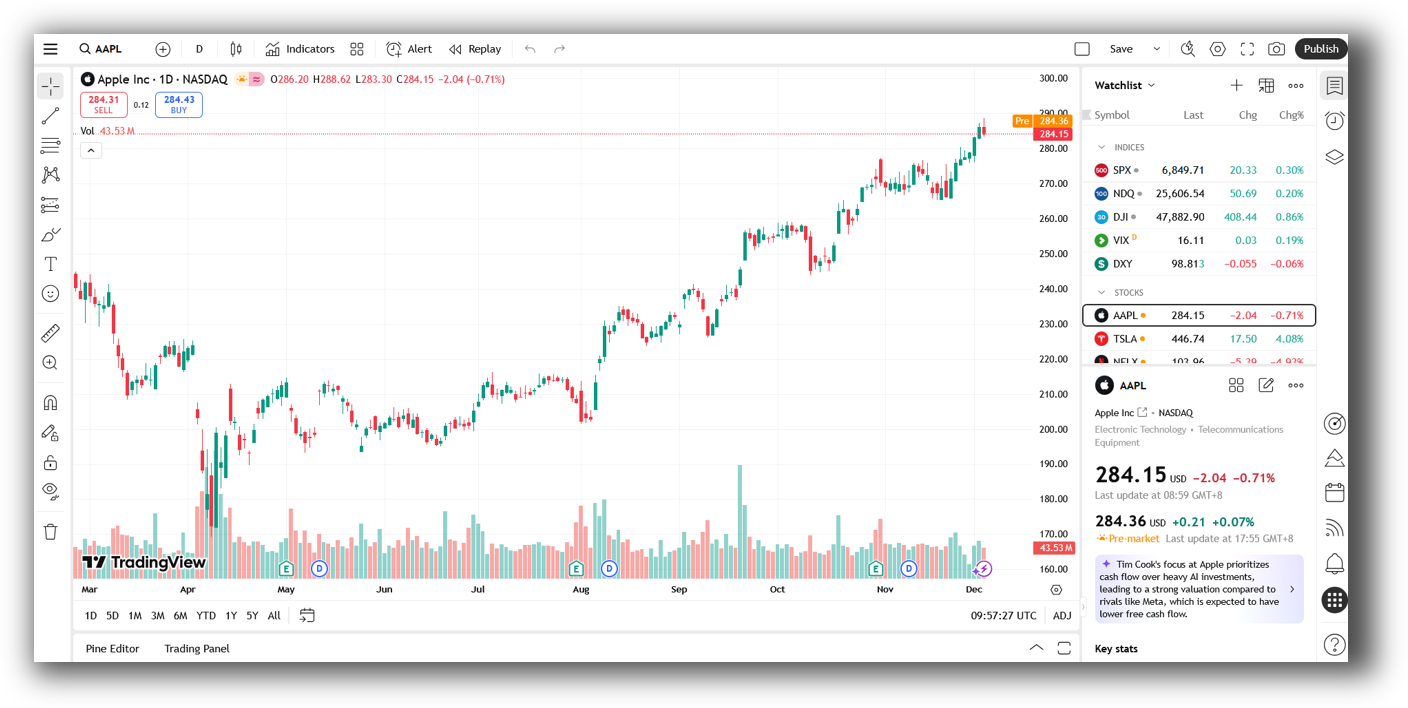
Market Access & Data Support in Optuma VS TradingView
Optuma connects to a wide array of data sources: equities, futures, forex, indices, and even point-and-figure charts. It offers institutional-quality data feeds, customizable to what markets you trade.
TradingView gives broad access to global markets including crypto, stocks, and forex. You can also connect real-time data from supported brokers.
However, TradingView’s data focus is chart-first. Optuma is data-first – it allows deeper control over data conditioning, filtering, and bar-by-bar accuracy needed for reliable backtesting.
Verdict: For data accuracy, Optuma wins. For general access and convenience, TradingView is easier.
Optuma Backtesting Interface:

TradingView Backtesting Interface:
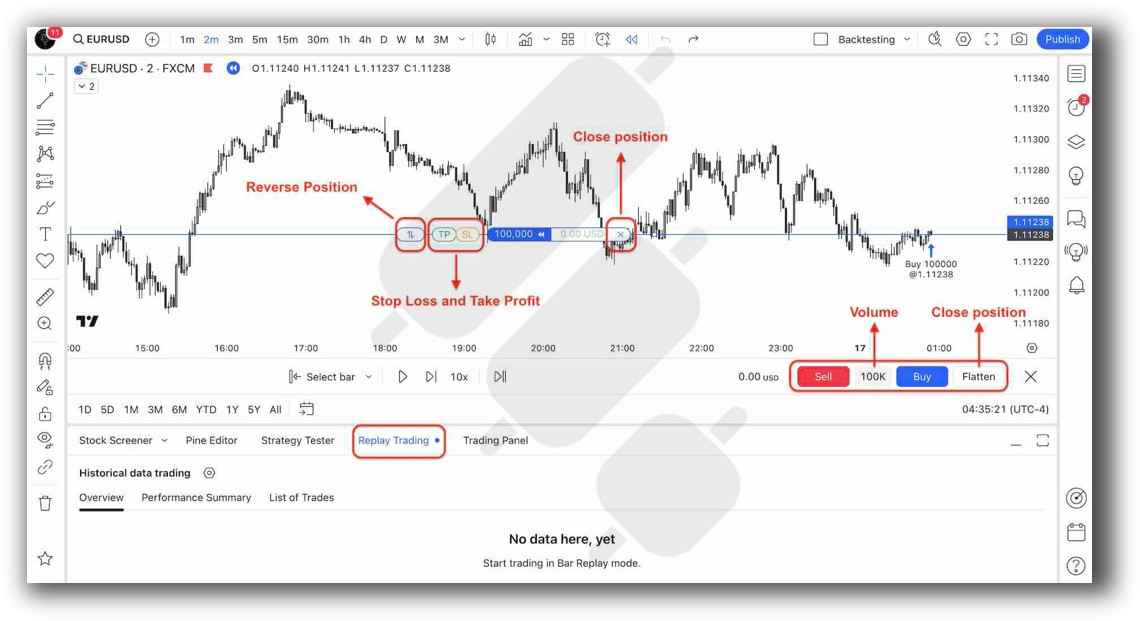
Building & Customizing Trading Strategies
In Optuma, you build strategies using the Optuma Scripting Language (OSL). It’s proprietary, with logic-based syntax that allows building and combining trading signals across multiple markets and timeframes.
TradingView uses Pine Script. It’s popular and simple to learn, great for building single-asset indicators or alerts. However, Pine lacks the scope to model strategies across portfolios or simulate capital usage.
Systematic traders need to consider capital allocation, correlation, and position sizing – features Optuma handles but TradingView does not.
Verdict: Optuma is better suited for traders building structured trading systems. TradingView is a good tool to test individual ideas visually.
Check Out: Trading System Development
Optuma Code Editor:

TradingView Code Editor:
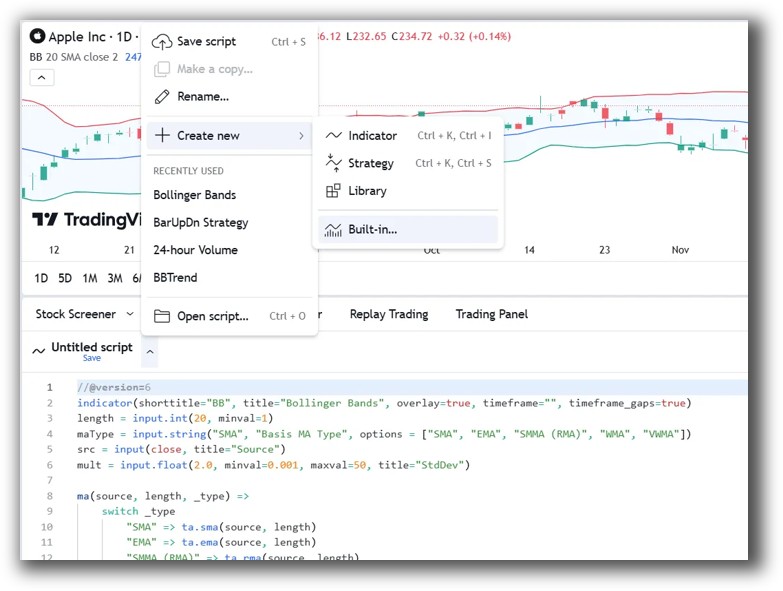
Backtesting Performance, Speed & Realism
This is where the rubber meets the road.
Optuma supports:
- Multi-symbol backtesting
- Portfolio-level testing
- Capital allocation logic
- Transaction cost modeling
- Equity curve tracking per strategy
TradingView supports:
- Indicator and signal testing on a single instrument
- No portfolio simulation
- No strategy-level capital or drawdown modeling
If you want to test a trend-following system on the ASX and US stocks simultaneously, or run a mean reversion system on the NASDAQ with capital rules, TradingView can’t do it. Optuma can.
Verdict: No contest. Optuma is far more powerful for backtesting. If your goal is confidence in your edge, backtest in Optuma – or better yet, use RealTest for faster and more realistic portfolio testing.
Check out: Backtesting | Drawdown
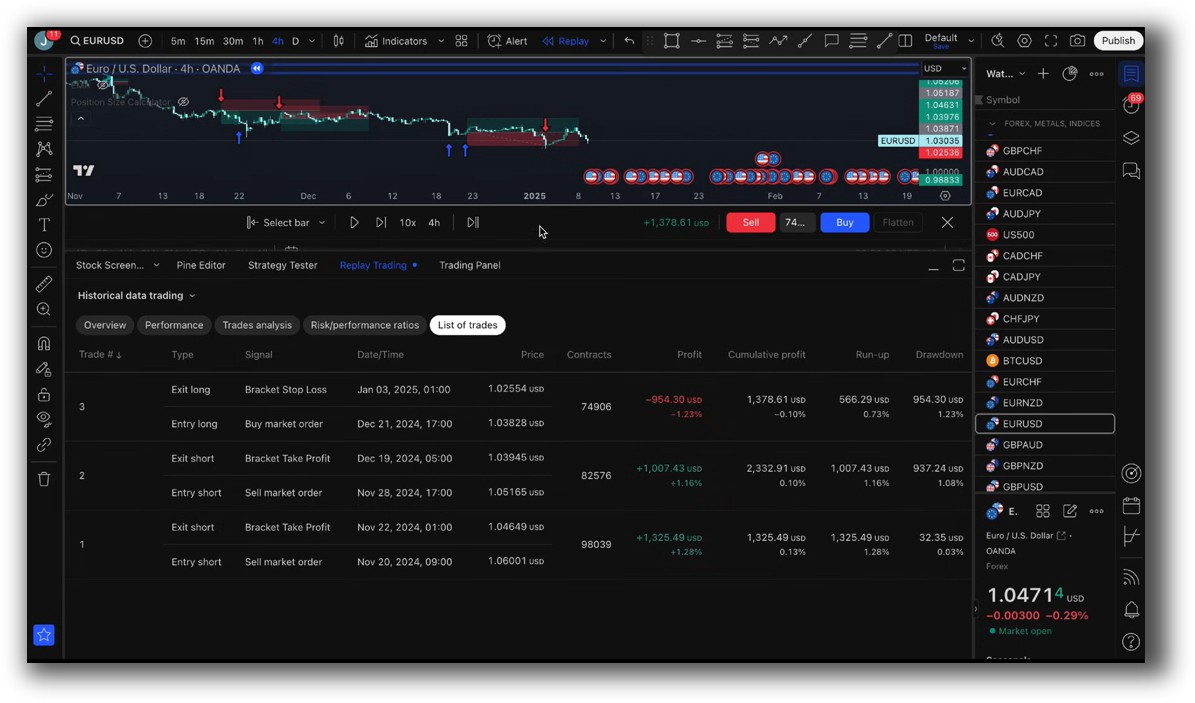
Optuma Backtest Report:
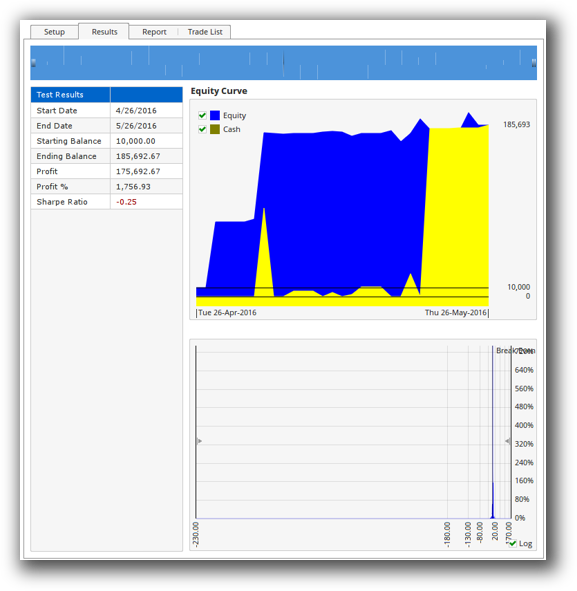
TradingView Backtest Report:
Strategy Optimization & Stress Testing Tools
Optuma includes modules for:
- Monte Carlo analysis
- Parameter variation
- Walk-forward analysis
- Robustness reporting
These are essential for filtering out curve-fit strategies that only work on historical quirks. While not as advanced as RealTest or dedicated tools like QuantAnalyzer, it’s far better than nothing.
TradingView’s optimization is limited to running multiple versions of a script with different variables – more manual, no robustness metrics, no walk-forward testing.
Verdict: Optuma is the better choice for serious traders wanting confidence in their results. TradingView is limited to basic tweaking.
Charting Features, Signal Exploration & Live Execution
TradingView wins on ease of use and chart visuals. It’s fast, clean, and packed with community indicators. Scanning is intuitive and code-free. Execution is also seamless for many brokers, especially in crypto and forex.
Optuma is more advanced but has a steeper learning curve. Its scanning capabilities are powerful and tailored for institutional-style workflows. Execution is possible via Interactive Brokers, but not Optuma’s strength.
Verdict: For charts and simplicity, TradingView is more accessible. For advanced scanning and scripting, Optuma is superior.
Check Out Order Types | Automated Trading Systems
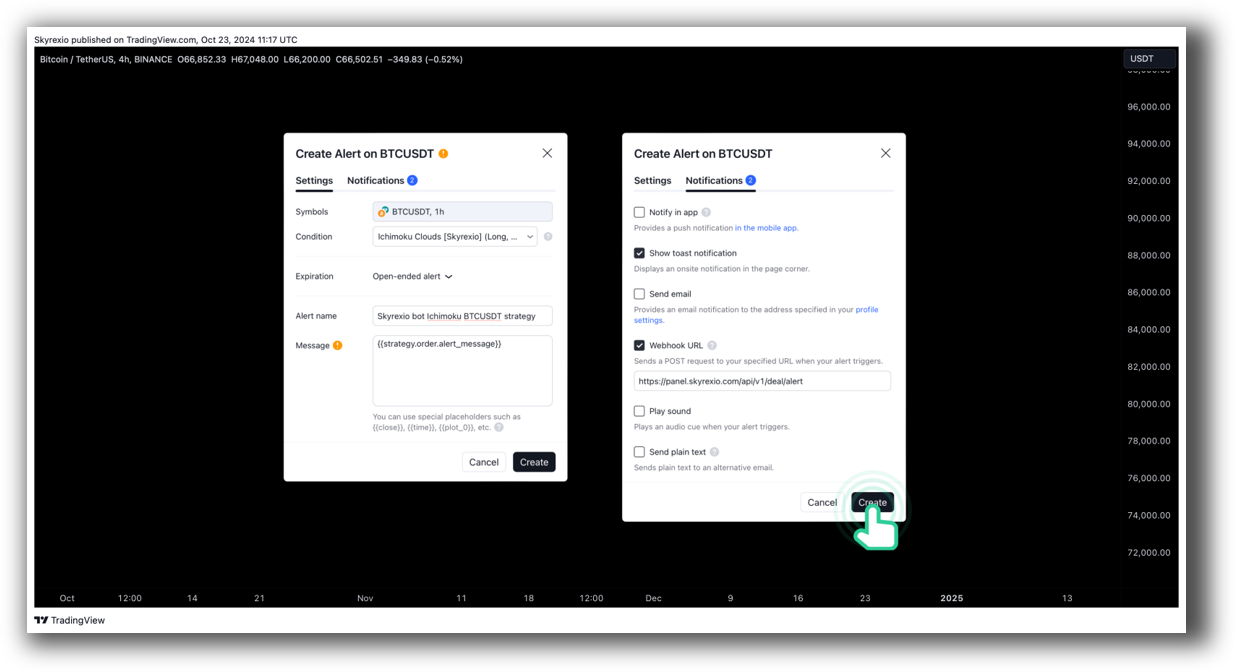
Optuma Automation Set Up:

TradingView Automation Set Up:
Support, Documentation & Learning Resources
TradingView’s community support is massive. You’ll find thousands of Pine Script examples and video tutorials.
Optuma’s documentation is comprehensive but more technical. Their email and phone support are helpful, and training is geared toward professional users.
Still, RealTest sets the gold standard here with lean, clear, and modern documentation that traders can follow without guessing.
Verdict: TradingView has the most approachable learning curve. Optuma is more complex, but has the depth when you’re ready for it.
Optuma Forum Front Page is illustrated down below:

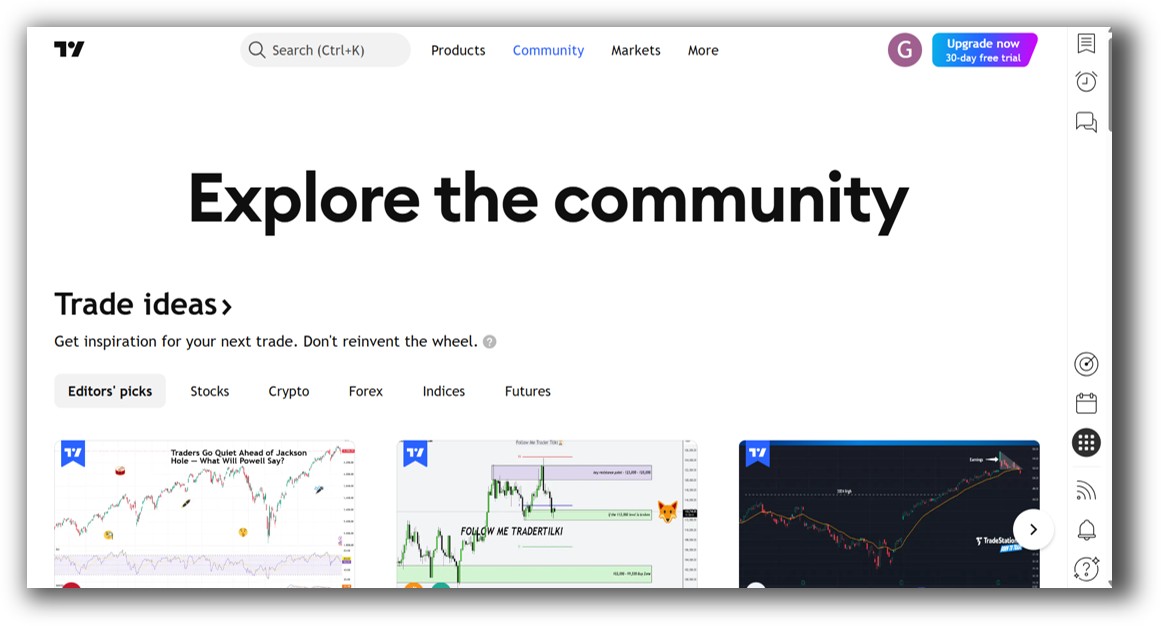
TradingView Community Ideas Front Page is illustrated down below:
Optuma VS TradingView: Which One Should You Use?
If your priority is charting, signal alerts, and simple indicator tweaking – TradingView is the better match. It’s fast, easy to use, and accessible.
But if you want to build, test, and run systematic strategies with proper rules, capital allocation, and realism – Optuma is clearly the stronger trading software.
Just remember: both are missing key strengths RealTest offers – particularly speed, ease of scripting, and fully realistic portfolio backtesting.
Our Recommendation
If you’re aiming to trade professionally or build confidence in your strategy, use RealTest as your primary backtesting software. You can layer in Optuma for charting and data visualizations or TradingView for quick scans and signal alerts.
Systematic trading success comes from clarity, realism, and alignment – not just pretty charts. Don’t fall into the trap of endless chart-watching.
Want The Rest of the Puzzle?
Backtesting software is just one piece. The real transformation happens when you align your tools, your systems, and your psychology with your goals.
If you’re tired of chasing tips and want to build wealth systematically, the next step is clear: The Trader Success System.
Inside, you’ll discover:
- Proven trading systems
- A step-by-step backtesting framework
- Position sizing tools
- Automation strategies that let you trade in 30 minutes or less
Trading and Backtesting Software Review List
- RealTest vs Amibroker
- RealTest VS TradeStation
- RealTest VS NinjaTrader
- RealTest VS MultiCharts
- RealTest VS Wealth-Lab
- RealTest VS Beyond Charts
- RealTest VS Optuma
- RealTest VS TradingView
- RealTest VS MetaTrader 4 (MT4)
- RealTest VS MetaTrader 5 (MT5)
- AmiBroker VS TradeStation
- AmiBroker VS NinjaTrader
- AmiBroker VS MultiCharts
- AmiBroker VS Wealth-Lab
- AmiBroker VS Beyond Charts
- AmiBroker VS Optuma
- AmiBroker VS TradingView
- AmiBroker VS MetaTrader 4 (MT4)
- AmiBroker VS MetaTrader 5 (MT5)
- TradeStation VS NinjaTrader
- TradeStation VS MultiCharts
- TradeStation VS Wealth-Lab
- TradeStation VS Beyond Charts
- TradeStation VS Optuma
- TradeStation VS TradingView
- TradeStation VS MetaTrader 4 (MT4)
- TradeStation VS MetaTrader 5 (MT5)
- NinjaTrader VS MultiCharts
- NinjaTrader VS Wealth-Lab
- NinjaTrader VS Beyond Charts
- NinjaTrader VS Optuma
- NinjaTrader VS TradingView
- NinjaTrader VS MetaTrader 4 (MT4)
- NinjaTrader VS MetaTrader 5 (MT5)
- MultiCharts VS Wealth-Lab
- MultiCharts VS Beyond Charts
- MultiCharts VS Optuma
- MultiCharts VS TradingView
- MultiCharts VS MetaTrader 4 (MT4)
- MultiCharts VS MetaTrader 5 (MT5)
- Wealth-Lab VS Beyond Charts
- Wealth-Lab VS Optuma
- Wealth-Lab VS TradingView
- Wealth-Lab VS MetaTrader 4 (MT4)
- Wealth-Lab VS MetaTrader 5 (MT5)
- Beyond Charts VS Optuma
- Beyond Charts VS TradingView
- Beyond Charts VS MetaTrader 4 (MT4)
- Beyond Charts VS MetaTrader 5 (MT5)
- Optuma VS TradingView
- Optuma VS MetaTrader 4 (MT4)
- Optuma VS MetaTrader 5 (MT5)
- TradingView VS MetaTrader 4 (MT4)
- TradingView VS MetaTrader 5 (MT5)
- MetaTrader 4 (MT4) VS MetaTrader 5 (MT5)

