
RealTest vs TradingView: Comparing Backtesting Software for Systematic Trading
If you’re a serious trader looking to eliminate guesswork and trade based on facts, not feelings, you’ve probably come across both RealTest and TradingView. So, which is the better backtesting software for building, testing, and refining trading systems?
Here’s the short answer:
- If your goal is fast, realistic, and scalable systematic trading, RealTest is the better choice.
- If your focus is charting, discretionary setups, and social sharing, TradingView may suit you better – but it lacks the depth required for robust strategy development.
Now, let’s break it down so you can make the right choice for your trading goals.
RealTest vs TradingView a Glance
Short on time? Here’s how RealTest and TradingView compare side by side.
|
Feature |
RealTest |
TradingView |
|
OS Compatibility |
Windows (64-bit only) |
Browser-based + Apps (Windows/Mac/Linux) |
|
Strategy Backtesting |
Portfolio-level, high realism |
Single-symbol, bar-by-bar replay |
|
Strategy Optimization |
Yes – Manual with scripting |
Basic – through Pine Script tweaks |
|
Charting |
Basic |
Advanced & visually polished |
|
Execution Integration |
Exports orders (e.g. to IBKR) |
Broker-integrated trading (e.g. OANDA) |
|
Programming Language |
Custom Scripting (Spreadsheet-style) |
Pine Script (v4/v5) |
|
Pricing |
$389 once + $159/year |
Free versions or premium – up to $59.95/month |
|
Ideal For |
Systematic traders & portfolio testing |
Visual traders, discretionary setups |
Platform Overview, Cost & Compatibility
RealTest runs natively on Windows and is designed for traders who want speed, control, and clean scripting. It works beautifully under a Windows VM for Mac users (Parallels recommended) but isn’t natively cross-platform.
TradingView is web-based and works on any device. It’s popular for its visual appeal and accessibility, but that convenience comes at the cost of advanced portfolio testing.
When it comes to cost, RealTest is a one-time purchase with low annual renewal fees. TradingView uses a subscription model, which becomes expensive over time if you rely on advanced features.
RealTest Main View:

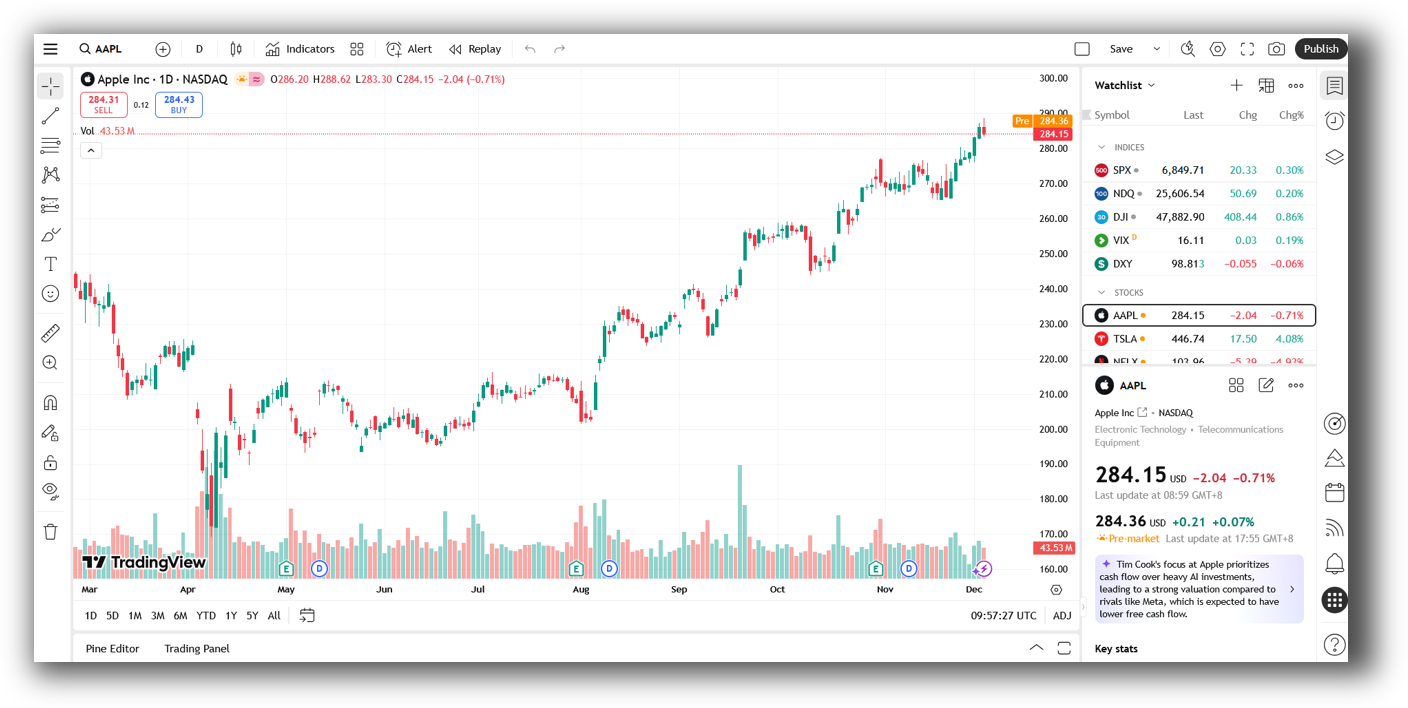
TradingView Main View:
Market Access & Data Support in RealTest and TradingView
RealTest is data-agnostic. It’s built to work with Norgate Data (clean, survivorship-bias-free EOD data) and Interactive Brokers, among others. It gives full control over what data you use and how.
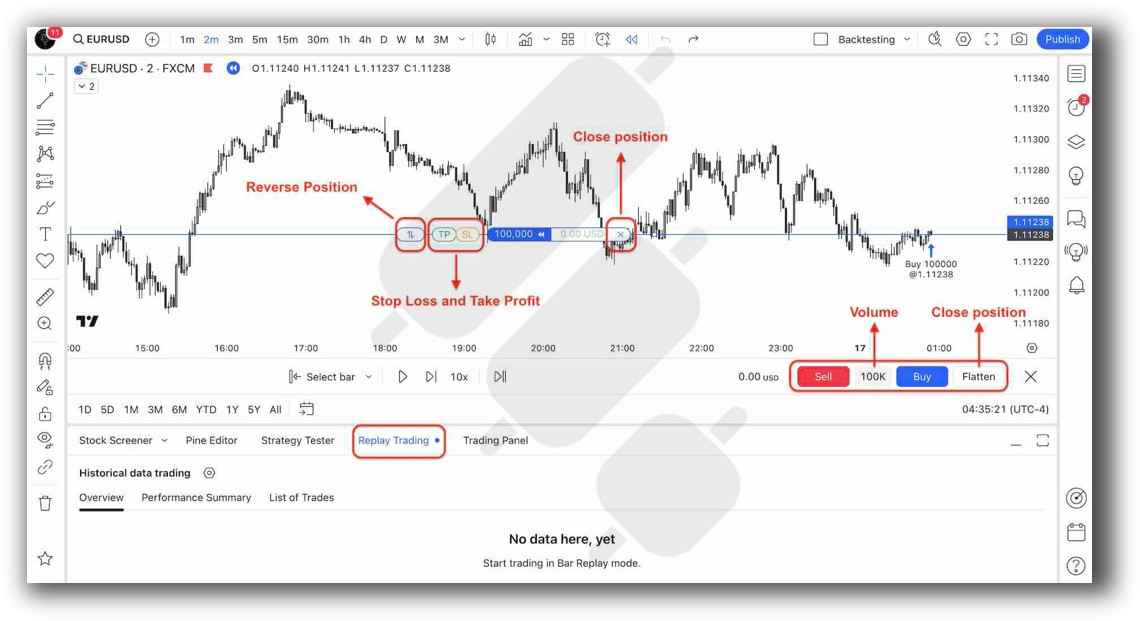
TradingView pulls real-time and delayed data from exchanges globally, with easy access to crypto, forex, stocks, and indices. However, it lacks historical delisted stock support – a major issue for realistic backtesting.
If you’re focused on backtesting, RealTest’s flexibility and data integrity give it a clear edge.
RealTest Backtesting Interface:

TradingView Backtesting Interface:
Building & Customizing Trading Strategies
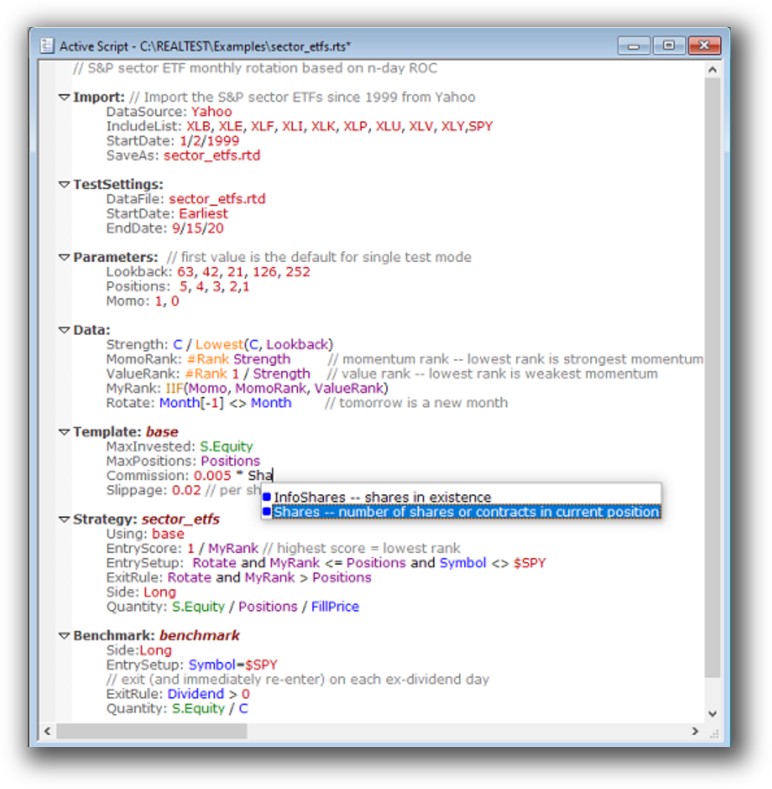
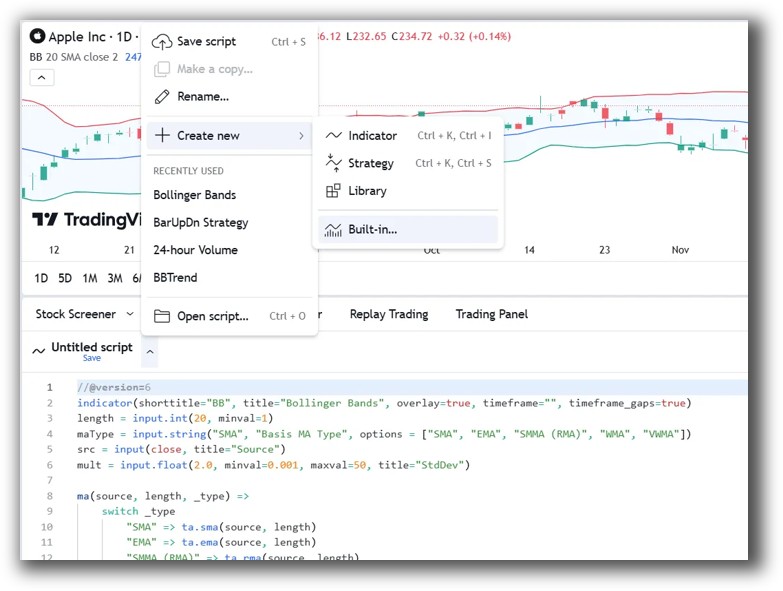
RealTest uses a spreadsheet-style scripting language that feels intuitive if you’re analytical but not a coder. It’s fast to learn and transparent, letting you build, test, and refine strategies logically.
TradingView uses Pine Script, a more traditional programming language. It’s great for indicators and signals, but can become complex when attempting full system logic, especially for portfolio-level logic or position sizing.
For analytical minds, RealTest combines simplicity and power, making it ideal.
Check Out: Trading System Development
RealTest Code Editor:
TradingView Code Editor:
Backtesting Performance, Speed & Realism
This is where the gap becomes a chasm.
RealTest:
- Blazing fast even on large datasets
- Supports realistic portfolio simulation (multiple positions, slippage, commissions)
- Runs multi-strategy portfolios and walks forward tests
- Shows equity curves, drawdowns, trade lists, and even CSV outputs for reporting
TradingView:
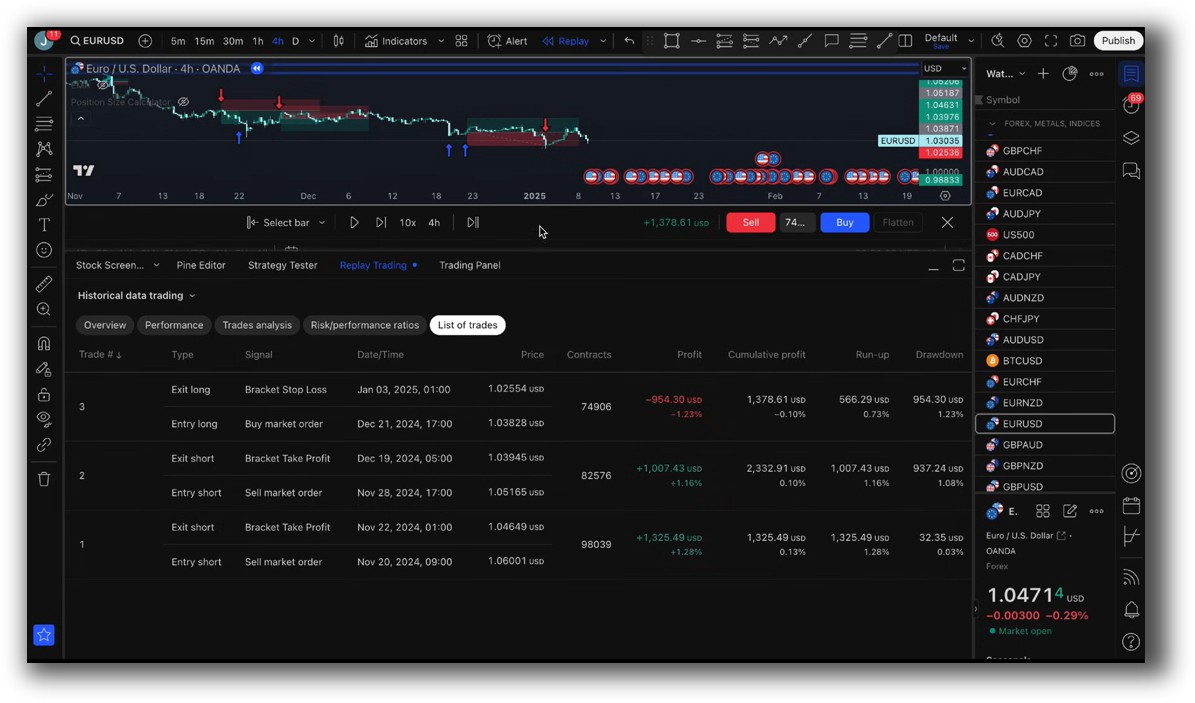
- Replay-style, bar-by-bar testing
- No portfolio-level simulation
- Cannot handle delisted stocks, splits, or accurate slippage modeling
If you’re aiming to trade multiple systems across markets, RealTest is the only logical choice.
Check out: Backtesting | Drawdown
RealTest Backtest Report:

TradingView Backtest Report:
Strategy Optimization & Stress Testing Tools
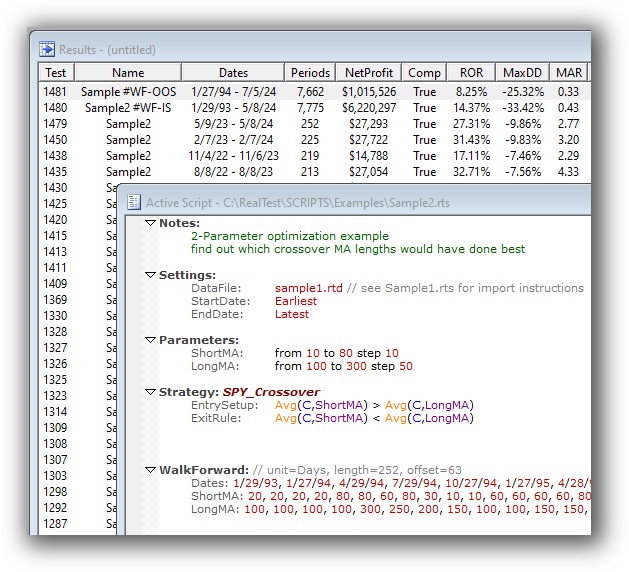
RealTest offers manual parameter variation and stress testing. This is a good thing – it avoids the trap of over-optimisation and curve fitting.
While it doesn’t have a slick GUI for brute-force testing, that’s not what a serious systematic trader needs. You’ll spend more time evaluating real edge, not fiddling with meaningless settings.
TradingView is limited to Pine Script code tweaks. No robustness testing, walk-forward analysis, or parameter sweeps, you’re flying blind.
Check Out: Trading System Optimization
Real Test Walk-Forward:
Charting Features, Signal Exploration & Live Execution
TradingView is the winner here for discretionary traders:
- Beautiful, responsive, real-time charts
- Extensive community indicators
- Built-in scanners and alerts
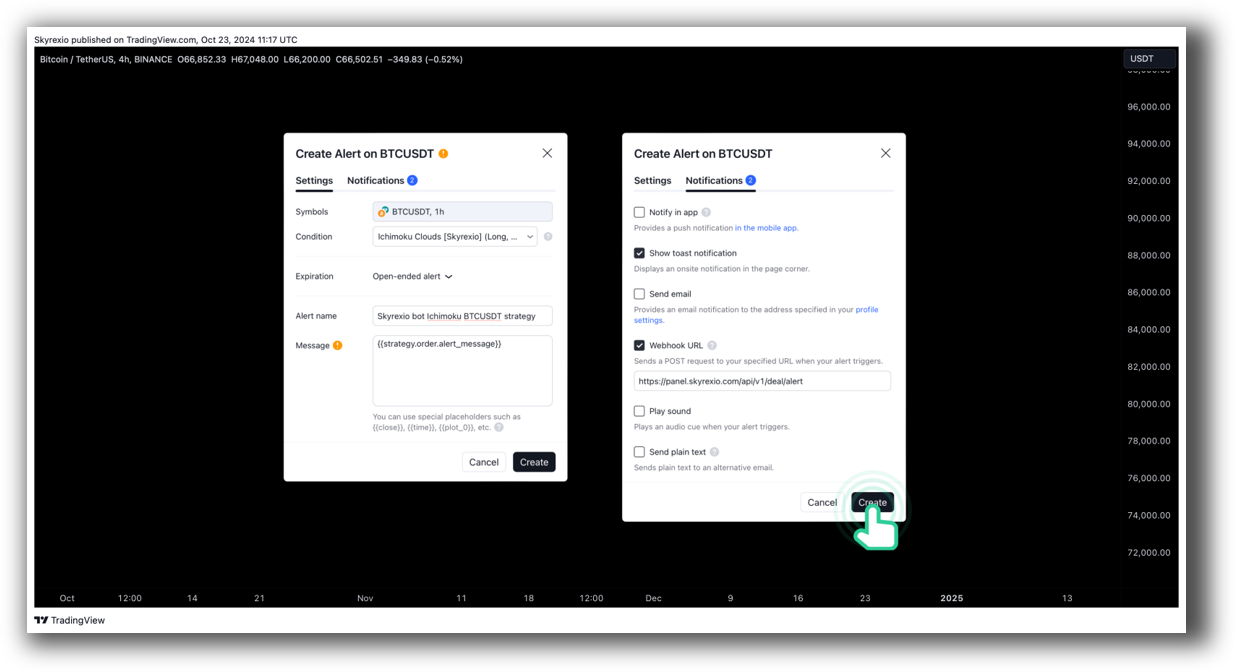
- Broker integration for live execution
But RealTest was never trying to compete on charting. It gives you clear entry/exit points based on system logic, not gut feel. You can still visualize trades using external tools if needed, but it’s designed for rules-first trading.
Execution-wise, RealTest can export orders to Interactive Brokers, allowing you to automate the process with a little scripting or external tools.
Check Out Order Types | Automated Trading Systems
RealTest Automation Set Up:

TradingView Automation Set Up:
Support, Documentation & Learning Resources
RealTest’s documentation is modern, clear, and logically structured. It’s written for serious traders who want to build real systems – not chase shiny indicators.
TradingView has extensive help docs and community posts, but they’re often skewed toward visual or indicator-based traders, not system developers.
If you want guidance on strategy design, systematic trading, and workflow, RealTest aligns far better with the Enlightened Stock Trading philosophy.
RealTest Forum is illustrated down below:

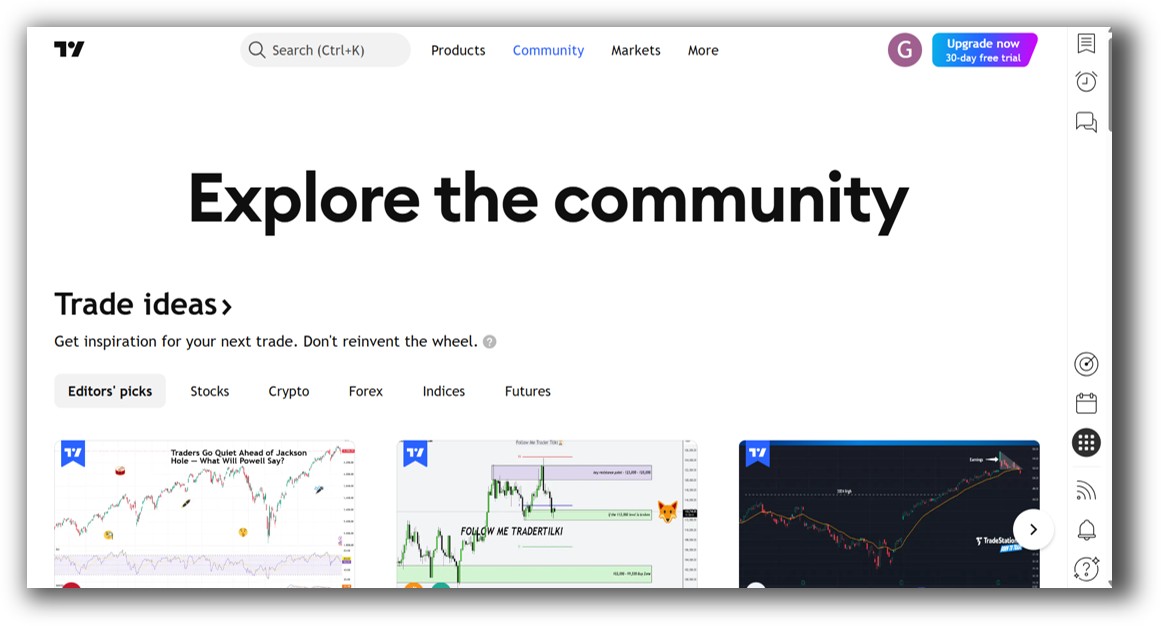
TradingView Community is llustrated down below:
RealTest vs TradeStation: Which One Should You Use?
Use RealTest if:
- You want fast, accurate portfolio-level backtesting
- You trade based on rules, not visual setups
- You need to manage risk and position sizing systematically
- You want to avoid curve fitting and optimize for robustness
Use TradingView if:
- You’re still trading based on gut feel or technical patterns
- You prefer visual interfaces and don’t need portfolio testing
- You’re sharing ideas or running live discretionary trades
Both tools serve different purposes. But if you’re building toward systematic, rules-based trading, RealTest is the right foundation.
Our Recommendation
At Enlightened Stock Trading, we work with hundreds of traders who started out frustrated, overworked, and inconsistent. Once they switched to systematic trading with RealTest, everything changed.
TradingView is still useful. In fact, we often recommend it for chart review and discretionary idea exploration. But for serious strategy building and risk management, RealTest is superior.
Remember – the key to trading success is internal alignment and using tools that match your goals and thinking style.
Want the Rest of the Puzzle?
RealTest gives you the tool.
But you still need to know:
- How to design profitable trading systems
- How to avoid overfitting
- How to build a diversified portfolio
- How to trade across different market conditions
That’s why we created The Trader Success System – the complete roadmap to become a confident, consistent, and profitable trader, no matter your starting point.
Trading and Backtesting Software Review List
- RealTest vs Amibroker
- RealTest VS TradeStation
- RealTest VS NinjaTrader
- RealTest VS MultiCharts
- RealTest VS Wealth-Lab
- RealTest VS Beyond Charts
- RealTest VS Optuma
- RealTest VS TradingView
- RealTest VS MetaTrader 4 (MT4)
- RealTest VS MetaTrader 5 (MT5)
- AmiBroker VS TradeStation
- AmiBroker VS NinjaTrader
- AmiBroker VS MultiCharts
- AmiBroker VS Wealth-Lab
- AmiBroker VS Beyond Charts
- AmiBroker VS Optuma
- AmiBroker VS TradingView
- AmiBroker VS MetaTrader 4 (MT4)
- AmiBroker VS MetaTrader 5 (MT5)
- TradeStation VS NinjaTrader
- TradeStation VS MultiCharts
- TradeStation VS Wealth-Lab
- TradeStation VS Beyond Charts
- TradeStation VS Optuma
- TradeStation VS TradingView
- TradeStation VS MetaTrader 4 (MT4)
- TradeStation VS MetaTrader 5 (MT5)
- NinjaTrader VS MultiCharts
- NinjaTrader VS Wealth-Lab
- NinjaTrader VS Beyond Charts
- NinjaTrader VS Optuma
- NinjaTrader VS TradingView
- NinjaTrader VS MetaTrader 4 (MT4)
- NinjaTrader VS MetaTrader 5 (MT5)
- MultiCharts VS Wealth-Lab
- MultiCharts VS Beyond Charts
- MultiCharts VS Optuma
- MultiCharts VS TradingView
- MultiCharts VS MetaTrader 4 (MT4)
- MultiCharts VS MetaTrader 5 (MT5)
- Wealth-Lab VS Beyond Charts
- Wealth-Lab VS Optuma
- Wealth-Lab VS TradingView
- Wealth-Lab VS MetaTrader 4 (MT4)
- Wealth-Lab VS MetaTrader 5 (MT5)
- Beyond Charts VS Optuma
- Beyond Charts VS TradingView
- Beyond Charts VS MetaTrader 4 (MT4)
- Beyond Charts VS MetaTrader 5 (MT5)
- Optuma VS TradingView
- Optuma VS MetaTrader 4 (MT4)
- Optuma VS MetaTrader 5 (MT5)
- TradingView VS MetaTrader 4 (MT4)
- TradingView VS MetaTrader 5 (MT5)
- MetaTrader 4 (MT4) VS MetaTrader 5 (MT5)


