

Amibroker Overview
Amibroker’s strength lies in system development. AFL (Amibroker Formula Language) allows you to define complex rules, portfolio-level position sizing, and dynamic entries and exits, making it well-suited for traders who want full control over their strategies.
For traders with an analytical mindset, Amibroker often feels intuitive and aligned with the need for deep customization and precision in system design.
Check Out: Trading System Development
Amibroker at a Glance
Short on time? Here’s a quick overview of Amibroker’s key features and capabilities.
| Feature | Amibroker |
| Year Released | 1995 |
| OS Compatibility | Windows only (Mac via VM) |
| Cost | One-time license (US$299–$339) |
| Programming Language | AFL (formula-based) |
| Backtesting Engine | Ultra-fast, portfolio-level |
| Broker Integration | Partial (via 3rd-party plugins) |
| Ideal For | System developers, backtesters |
Platform Overview, Cost & Compatibility
Amibroker is a standalone desktop application with a one-time license fee. It runs only on Windows natively, though Mac users can use it via Parallels or Bootcamp, not ideal, but workable. The tradeoff? You get a lightning-fast backtesting engine and a serious system development environment.
Amibroker Main View:

Market Access & Data Support in Amibroker
Amibroker gives you freedom to choose your own data feed, from end-of-day to intraday from providers like Norgate, Interactive Brokers, or IQFeed. This decoupling means higher flexibility but also more setup time.
Amibroker Backtesting Interface:
Building & Customizing Trading Strategies
Amibroker’s strength lies in system development. AFL (Amibroker Formula Language) lets you define complex rules, portfolio level position sizing, and dynamic entries and exits. It is designed for the system trader who wants full control.
For traders with an analytical mindset, Amibroker often feels intuitive and well aligned with the need for control and customization.
Check Out: Trading System Development
Amibroker Code Editor:

Backtesting Performance, Speed & Realism
Amibroker delivers lightning fast backtesting, capable of processing millions of bars per second. It supports portfolio level backtests, advanced metrics, walk forward analysis, and detailed position sizing.
If your goal is to test hundreds of systems quickly and analyze risk across a diversified portfolio, Amibroker is hard to beat.
Check out: Backtesting | Drawdown
Amibroker Backtest Report:

Strategy Optimization & Stress Testing Tools
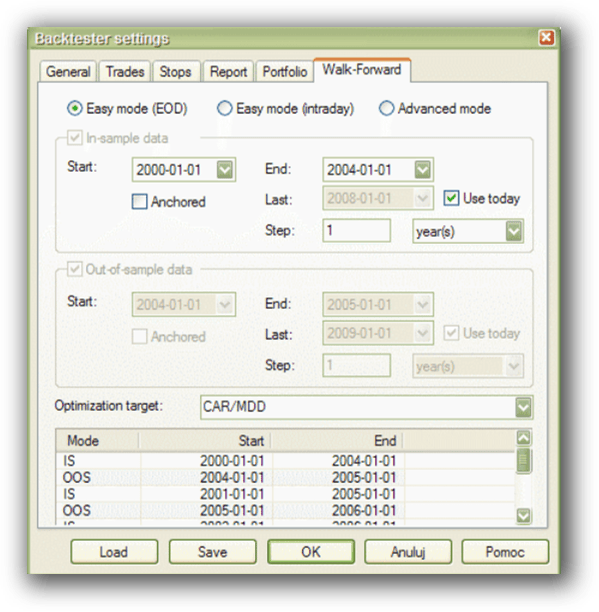
Amibroker includes walk forward testing, parameter sensitivity analysis, Monte Carlo simulation, and multi core processing for optimization. This allows you to stress test strategies under changing market conditions and reduce the risk of curve fitting.
If robustness is your goal, Amibroker provides a strong toolkit for building and validating systematic trading strategies.
Check Out: Trading System Optimization
Amibroker Walk-Forward Tab:
Charting Features, Signal Exploration & Live Execution
Amibroker offers best in class charting, multi timeframe support, and extremely flexible scanning capabilities. This makes it a strong choice for traders who rely heavily on visual analysis and custom exploration.
If charting and scan customization are important to your workflow, Amibroker stands out as a strong option.
Check Out Order Types | Automated Trading Systems
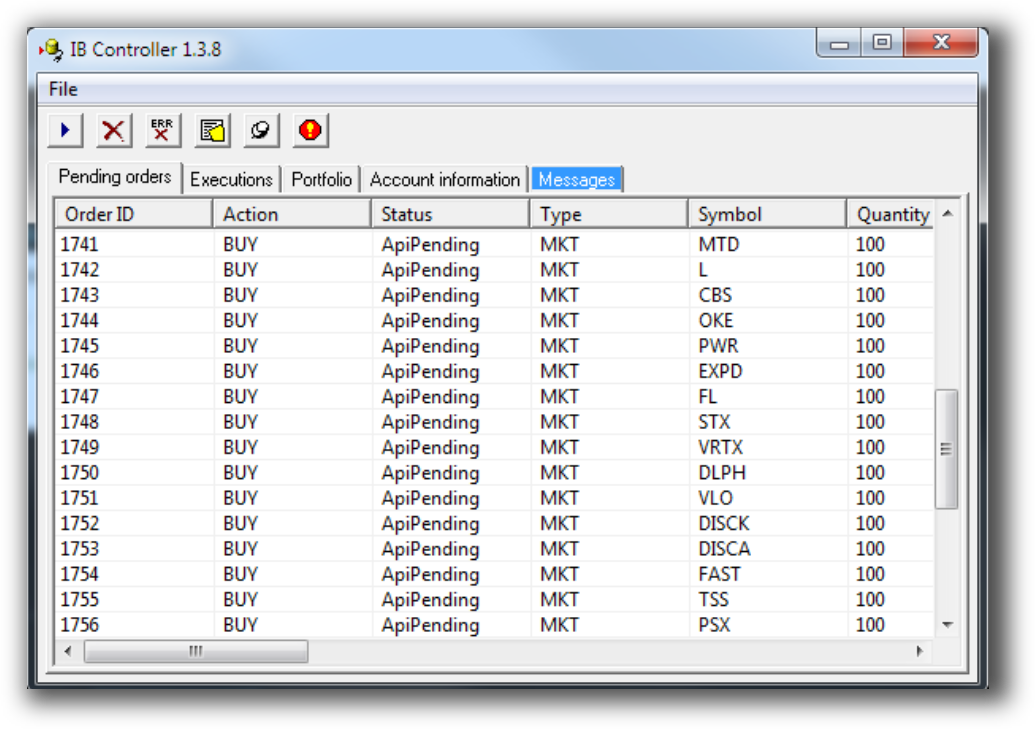
Amibroker Automation Set Up (IB Controller):
Support, Documentation & Learning Resources
Amibroker’s official documentation is detailed but technical. The user community is strong, though support is largely forum-based. That said, the knowledge base at Enlightened Stock Trading (and in our courses) makes it far easier to master.
Amibroker Forum is illustrated down below:

Bottomline
If you’re looking for speed, flexibility, and the ability to trade multiple markets and timeframes using fully developed systematic strategies, Amibroker is a strong backtesting software choice.
That said, don’t fall into the trap of choosing software based only on what your broker recommends, or the first platform you come across. Amibroker is an excellent choice, but it’s still worth keeping an open mind and exploring other options to ensure you select the platform that best fits your needs.
Want the Rest of the Puzzle?
To become a confident, profitable trader, you also need:
- A structured trading plan
- A portfolio of systems
- Proper risk management
- Accurate analytics
- The mindset to stay consistent
That’s what we give you inside The Trader Success System, the complete framework to go from hesitant and inconsistent, to confident and systematic in just a few months.
Trading and Backtesting Software Review List
- RealTest vs Amibroker
- RealTest VS TradeStation
- RealTest VS NinjaTrader
- RealTest VS MultiCharts
- RealTest VS Wealth-Lab
- RealTest VS Beyond Charts
- RealTest VS Optuma
- RealTest VS TradingView
- RealTest VS MetaTrader 4 (MT4)
- RealTest VS MetaTrader 5 (MT5)
- AmiBroker VS TradeStation
- AmiBroker VS NinjaTrader
- AmiBroker VS MultiCharts
- AmiBroker VS Wealth-Lab
- AmiBroker VS Beyond Charts
- AmiBroker VS Optuma
- AmiBroker VS TradingView
- AmiBroker VS MetaTrader 4 (MT4)
- AmiBroker VS MetaTrader 5 (MT5)
- TradeStation VS NinjaTrader
- TradeStation VS MultiCharts
- TradeStation VS Wealth-Lab
- TradeStation VS Beyond Charts
- TradeStation VS Optuma
- TradeStation VS TradingView
- TradeStation VS MetaTrader 4 (MT4)
- TradeStation VS MetaTrader 5 (MT5)
- NinjaTrader VS MultiCharts
- NinjaTrader VS Wealth-Lab
- NinjaTrader VS Beyond Charts
- NinjaTrader VS Optuma
- NinjaTrader VS TradingView
- NinjaTrader VS MetaTrader 4 (MT4)
- NinjaTrader VS MetaTrader 5 (MT5)
- MultiCharts VS Wealth-Lab
- MultiCharts VS Beyond Charts
- MultiCharts VS Optuma
- MultiCharts VS TradingView
- MultiCharts VS MetaTrader 4 (MT4)
- MultiCharts VS MetaTrader 5 (MT5)
- Wealth-Lab VS Beyond Charts
- Wealth-Lab VS Optuma
- Wealth-Lab VS TradingView
- Wealth-Lab VS MetaTrader 4 (MT4)
- Wealth-Lab VS MetaTrader 5 (MT5)
- Beyond Charts VS Optuma
- Beyond Charts VS TradingView
- Beyond Charts VS MetaTrader 4 (MT4)
- Beyond Charts VS MetaTrader 5 (MT5)
- Optuma VS TradingView
- Optuma VS MetaTrader 4 (MT4)
- Optuma VS MetaTrader 5 (MT5)
- TradingView VS MetaTrader 4 (MT4)
- TradingView VS MetaTrader 5 (MT5)
- MetaTrader 4 (MT4) VS MetaTrader 5 (MT5)


